Mastering Atmospheric Depth: The Ultimate Smoke Photoshop Brush Collation for Professional Photo Manipulation
In the competitive world of digital design, visual impact is everything. Whether you are crafting a high-stakes movie poster, designing a sleek app interface, or creating a compelling social media ad, the ability to manipulate light, shadow, and atmosphere can be the difference between a good image and a great one. This is where specialized tools become indispensable. Among these, the Smoke Photoshop Brush Collation stands out as a comprehensive solution for designers seeking to add realism, drama, and fluidity to their compositions without spending hours masking complex elements.
We have curated this bundle package specifically for your convenience. Instead of scouring the internet for disparate resources that may not blend well together, we have worked meticulously on brush quality and maintenance to provide a unified toolkit. By combining three distinct types of brushes into one cohesive set, we ensure that you never have to leave your workspace to complete a project. From ethereal wisps to dense fog banks, this collection empowers you to execute professional-grade photo manipulation with ease and precision.
The Anatomy of a High-Quality Digital Brush
Not all brushes are created equal. In fact, many free or low-quality brushes found online suffer from pixelation, inconsistent opacity, or unnatural edges when scaled. Our approach to the Smoke Photoshop Brush Collation addresses these common pain points head-on. Each brush in this set is engineered with high-definition resolution, ensuring crisp details regardless of how you use them.
The primary smoke brushes boast a massive size of 3000 pixels. This generous canvas allows for incredible flexibility. You can scale these brushes down for subtle background textures or blow them up to fill an entire screen without losing any sharpness. Furthermore, because they are vector-friendly in their creation process (rendered at 300 DPI), they maintain their integrity whether you are working on a mobile wallpaper or a billboard-sized print. The variety in shape is intentional; no two brushes are identical. Some offer soft, diffused edges perfect for blending, while others provide more defined, swirling structures ideal for focal points. This diversity means you can match the brush stroke to the specific energy of your subject matter, whether it’s a calm product shot or an action-packed video still.
What’s Inside the Bundle?
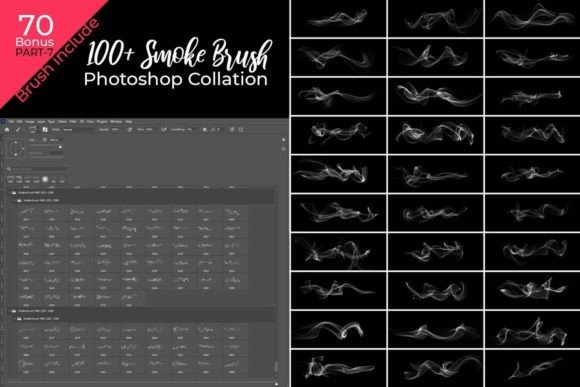
We believe in providing more value than just the core promise. That is why this Smoke Photoshop Brush Collation includes a total of 170 Photoshop Brushes, divided strategically to cover every atmospheric need you might encounter in your workflow.
- 100 Smoke Brushes: These are the stars of the show. Ranging from thin, ghostly trails to thick, billowing clouds, these brushes allow you to create artificial looks that mimic natural phenomena with stunning accuracy. They are designed for both hand-drawn effects and quick stamping techniques.
- 50 Drop Brushes: Liquids add weight and realism to images. These brushes simulate water droplets, oil spills, or condensation. When paired with smoke, they can create moody, noir-style atmospheres or fresh, clean aesthetics depending on the lighting.
- 20 Fog Brushes: Sometimes, less is more. Fog brushes are essential for creating depth, hiding unwanted background elements, or establishing a mysterious tone. They are particularly effective in landscape photography edits and horror-themed designs.
Every file is provided in the standard .abr (Photoshop Abr) format, ensuring instant compatibility with Adobe Photoshop and other major graphic design software that supports custom brush libraries. The inclusion of bonus brushes means you get a robust toolkit right out of the box, eliminating the need for additional purchases or resource hunting.
Practical Applications Across Industries
Why do designers need such a specific toolset? The versatility of the Smoke Photoshop Brush Collation makes it applicable across a wide spectrum of creative industries. Let’s explore some practical scenarios where these brushes shine.
Movie Posters and Promotional Art
Think of the most iconic movie posters you’ve seen. Almost always, there is an element of mystery or intensity conveyed through smoke, fog, or debris. Using our smoke brushes, you can wrap a character in swirling mist, create a dramatic entrance for a villain, or add a sense of chaos to an action scene. The ability to control the density and direction of the smoke gives you narrative control over the viewer’s eye.
Product Photography and E-Commerce
High-end product shots often use "smoke bombs" or dry ice in real-life shoots to make products like perfume, electronics, or beverages look premium. With this brush collation, you can achieve that same luxurious effect digitally. Place a bottle of cologne amidst a cloud of white smoke, or let vapor rise from a cold drink. It adds a tactile quality to flat images, making them pop on web stores and flyers.
Web Design and App Interfaces
Modern UI/UX design trends favor immersive backgrounds. Subtle smoke animations or static smoke layers can add depth to landing pages without distracting from the call-to-action buttons. Because our brushes are high-definition, they remain crisp even on Retina displays and 4K monitors. You can create seamless patterns or isolated elements for parallax scrolling effects.
Print Media: Flyers, Posters, and Cards
When printing, resolution is king. Our brushes are optimized for 300 DPI, which is the industry standard for high-quality print. Whether you are designing a concert flyer with a gritty, smoky aesthetic or an elegant wedding card with a hint of fog, these brushes will reproduce beautifully on paper, avoiding the blurry artifacts that plague lower-quality digital assets.
Workflow Efficiency and Ease of Use
One of the biggest hurdles in photo manipulation is time. Complex smoke effects traditionally required layering multiple images, extensive masking, and color grading. Our Smoke Photoshop Brush Collation simplifies this drastically. The brushes are pre-set with varying opacities and dynamics, allowing for a "free hand custom" experience that feels organic rather than robotic.
You can easily set any photo against any background. For instance, if you have a portrait taken against a plain white backdrop, you can use the fog brushes to introduce a moody gray atmosphere, effectively changing the context of the image. Or, take a static image of a car and use the drop and smoke brushes to simulate speed and motion blur. The learning curve is minimal. If you know how to paint in Photoshop, you can start creating professional results immediately. The brushes respond to pressure sensitivity (if using a tablet), giving you granular control over the thickness and transparency of each stroke.
Considerations for Best Results
While these brushes are powerful, achieving the best results requires a few best practices. First, always work on a separate layer. This allows you to adjust the blending mode of the smoke—try modes like Multiply for dark shadows or Screen for light, glowing effects. Second, don’t be afraid to distort your strokes. After painting with a smoke brush, use the Transform tool (Ctrl+T) to stretch, rotate, or skew the smoke to fit the perspective of your scene. Finally, color grade your smoke to match the ambient light of your base image. A warm-toned smoke will look out of place in a cool, blue-tinted scene unless adjusted.
The Smoke Photoshop Brush Collation is not just a collection of files; it is a license to experiment. Whether you are a seasoned graphic designer looking to streamline your asset library or a hobbyist eager to elevate your photo editing skills, this bundle provides the necessary tools to break free from limitations. With 170 high-definition brushes at your disposal, the only limit is your imagination. Start manipulating your photos today and see how a little bit of smoke can transform your entire composition.