Matisse Sunflowers: Integrating Retro Botanical Aesthetics into Creative Workflows
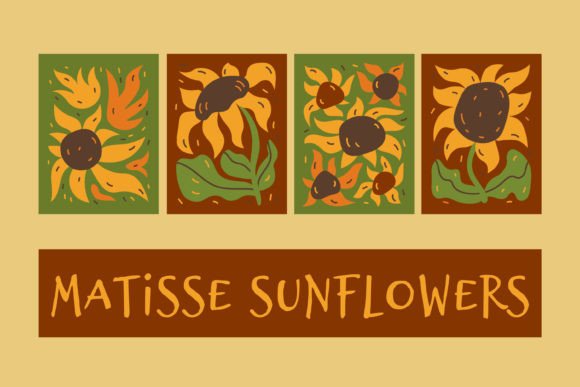
In the landscape of digital asset management and creative production, selecting the right visual elements is often the most time-consuming phase of a project. Designers, marketers, and hobbyists frequently struggle to find assets that balance artistic integrity with technical versatility. This is where specialized collections like Matisse Sunflowers become critical infrastructure for efficient workflow execution. Drawing inspiration from Henri Matisse’s iconic cut-outs and vintage botanical illustrations, this collection offers a distinct blend of liquid fluidity and retro charm. It is not merely a set of images; it is a modular toolkit designed to accelerate the creation process for everything from high-end interior prints to rapid social media content.
The core value of integrating these trendy, hand-drawn sunflowers into your projects lies in their structural diversity and file compatibility. The collection includes four distinct JPG and PNG variations, alongside an EPS vector file and a high-resolution composite image. Understanding how these specific formats interact with different software environments allows creators to maintain quality control across multiple output channels without redundant work.
Technical Specifications and Asset Organization
Before diving into design applications, it is essential to audit the technical components of the asset pack. Efficient workflows begin with proper file organization and format selection. The Matisse Sunflowers zip archive is structured to support both raster-based photo editing and vector-based graphic design, ensuring compatibility across Adobe Creative Cloud, Affinity Suite, Canva, and open-source alternatives like GIMP or Inkscape.
- 4 JPG Files: These are optimized for quick previewing and direct insertion into presentation decks, basic web layouts, or print-on-demand mockups. They provide immediate visual reference without requiring heavy processing power.
- 4 PNG Files (Transparent Background): This is the most versatile component for layering. The transparent background allows designers to place the wavy, melting sunflower motifs over any color scheme, texture, or photographic background without manual masking. This feature is crucial for maintaining consistency in branding materials.
- 1 EPS File: As a vector format, the EPS file ensures infinite scalability. Whether you are designing a business card or a large-format banner, the lines remain crisp. This file contains all four poster elements, making it ideal for bulk printing or professional pre-press workflows.
- 1 Composite JPG/PNG (8000 x 4500 px): This high-resolution master file serves two purposes. First, it provides a complete layout reference. Second, its dimensions are specifically calculated for sublimation printing on cylindrical objects like mugs and tumblers. By using this file directly, users can bypass the tedious process of arranging individual elements manually.
- RGB 3000 x 4000 px High Resolution (300 dpi): For standard print requirements such as greeting cards, posters, and book covers, the 300 DPI resolution ensures sharp, magazine-quality output. The RGB color profile is suitable for screen display and modern digital printers, though conversion to CMYK may be required for offset printing services.
Integrating Matisse Sunflowers into Design Workflows
Implementing these assets effectively requires aligning the visual style with the project’s end goal. The "melting" and "distorted" nature of the flowers suggests a playful, organic aesthetic that works exceptionally well in contexts demanding warmth and nostalgia. Below are practical scenarios where this collection fits seamlessly into existing processes.
Print-on-Demand and Product Design
For entrepreneurs running Etsy shops or Amazon KDP stores, speed-to-market is a competitive advantage. The inclusion of the 8000 x 4500 px composite file streamlines the creation of drinkware designs. Instead of sourcing separate floral elements and struggling with alignment, designers can utilize the pre-arranged EPS or high-res PNG. This reduces the setup time for mug wraps significantly. Furthermore, the transparent PNGs allow for easy integration into existing product mockups. You can overlay the sunflowers onto a white ceramic mug template in Photoshop, adjusting opacity or blending modes to achieve realistic lighting effects without altering the original artwork.
Stationery and Invitation Design
The vintage wavy flower aesthetic pairs naturally with serif typography and muted pastel palettes. When creating wedding invitations, baby shower cards, or seasonal greeting cards, the Matisse Sunflowers act as focal points. Because the files are available in vector format, designers can experiment with scale and color instantly. If a client requests a monochrome version for a minimalist theme, the EPS file allows for one-click recoloring. For tactile projects, the 300 DPI resolution ensures that when the design is sent to a local printer, the fine details of the hand-drawn leaves do not pixelate. This attention to detail enhances the perceived value of the final product.
Social Media and Digital Marketing
Content creators need assets that pop on small screens while remaining recognizable. The bold, fluid lines of the distorted botany elements translate well to Instagram stories, Pinterest pins, and Facebook banners. The transparent PNGs are particularly useful here. Marketers can place the sunflowers behind text overlays to create depth. For example, a summer sale announcement can use the yellow and orange hues of the sunflowers to evoke warmth and urgency. Since the files are RGB optimized, they will appear vibrant on mobile devices. Additionally, the variety within the set—four distinct compositions—allows for A/B testing different visual hooks without needing new photoshoots.
Home Decor and Interior Styling
For interior decorators and DIY enthusiasts, these files serve as the foundation for custom wall art. The retro style complements mid-century modern decor trends. Users can print the 8000 x 4500 px composite on canvas or high-quality matte paper to create a panoramic gallery wall. The vector EPS file is also ideal for laser cutting or vinyl decal creation. Imagine cutting the wavy leaf shapes out of colored cardstock to create layered shadow box art. The precision of the vector paths ensures clean cuts, which is vital for physical craft projects.
Best Practices for Implementation and Quality Control
To maximize the utility of the Matisse Sunflowers collection, adhere to the following operational guidelines:
- Color Management: Always check the color mode before sending files to print. While the source files are RGB, professional offset printers require CMYK. Use your design software’s convert function to preview how the vibrant yellows and greens will shift in print, allowing you to adjust saturation beforehand.
- Layer Separation: When working with the EPS file, ensure you expand the appearance or convert outlines if you plan to edit specific nodes. This prevents font or path errors when transferring files between different versions of design software.
- Resolution Verification: Before exporting final JPEGs for web use, downsample the 300 DPI files to 72 DPI. Large, high-resolution images slow down website loading times, negatively impacting SEO and user experience. Keep the high-res originals archived for future print needs.
- Consistency Checks: If using the transparent PNGs in a multi-page document (like a brochure), ensure the lighting and shadow directions match across all pages. Since the sunflowers have a "liquid" look, slight inconsistencies in placement can break the illusion of cohesion.
Expanding Utility Through Cross-Platform Integration
The true power of this asset pack emerges when integrated into broader creative ecosystems. For instance, educators and bloggers can use the sunflowers to illustrate articles about summer gardening or art history. The historical nod to Matisse adds an educational layer that simple clipart lacks. In a learning management system, these images can serve as clickable thumbnails for module headers, enhancing engagement through visual appeal.
Similarly, textile designers can utilize the vector EPS files to create seamless patterns. By tiling the wavy flowers, you can generate fabric repeats for apparel or home textiles. The high-resolution nature of the assets ensures that even intricate pattern details remain visible at a glance. This cross-application capability means a single purchase supports diverse revenue streams, from digital downloads to physical merchandise.
Conclusion on Workflow Efficiency
The Matisse Sunflowers collection represents more than just decorative imagery; it is a strategic resource for reducing friction in the creative process. By providing multiple formats—from scalable vectors to ready-to-print composites—it caters to the varied needs of professionals who must switch between digital and physical mediums daily. The transparent backgrounds and high-resolution outputs eliminate the need for extensive post-processing, allowing creators to focus on composition and messaging rather than technical remediation. Whether you are designing a personalized gift, launching a product line, or updating brand visuals, integrating these retro-botanical elements offers a reliable, aesthetically pleasing solution that aligns with modern design trends and practical workflow demands.